Whiiteroom - Whitelist App & Website Blocker for Windows and Android
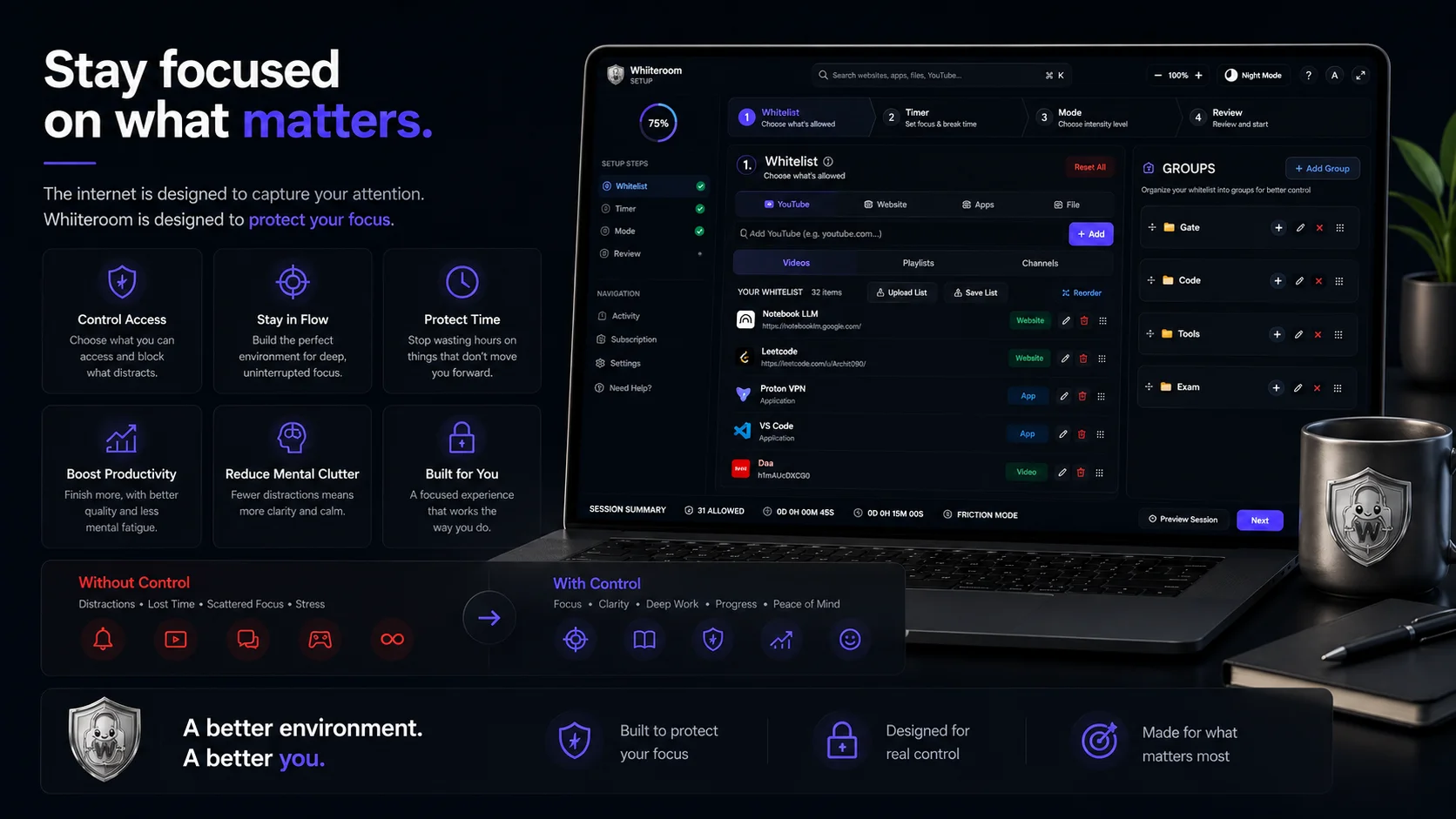
Explore Whiiteroom Features
Select an option below to test the live simulator or watch feature walkthroughs.
Desktop Mockup Note: The top header bar, left sidebar, and bottom summary bar (with Preview & Next buttons) are fully interactable & clickable! The central area shows real app screenshots for each setup step.

.webp)
Why standard blocker apps fail you
Whiiteroom is the only focus app with both whitelist and blacklist blocking — plus a built-in distraction-free browser that strips YouTube down to just the content you need.
OS-Level Enforcement
Unlike easy-to-bypass browser extensions, Whiiteroom enforces session limits directly at the operating system level. Features restart persistence so closing app or rebooting won't break your active session rules.
Whitelist Mode
The ultimate focus environment: allow specific desktop/mobile apps, website domains, exact URL pages, or local PDF files. Everything else is blocked by default — perfect for exams, study, and deep work.
Blacklist Mode
Prefer open web access? Target and block only specific time-sink apps, distracting domains, or social URLs while keeping the rest of the web accessible — ideal for researchers, journalists, and writers.
Distraction-Free YouTube
Watch approved educational channels, playlists, or specific video URLs inside Whiiteroom's custom browser — with recommendation feeds, comments, and autoplay traps completely stripped away.
Auto-Start Scheduler
Schedule recurring or one-time focus sessions for any day and time. Whiiteroom auto-starts your session on time with custom per-session lists and pre-launch heads-up notifications.
Private Distraction Score
Track your focus history, total clean study hours, and distraction attempt counts over time. 100% private and stored locally on your device — your browsing data is never collected or sold.
Session & Scheduled Breaks
Set flexible session durations alongside scheduled break intervals. Take timed rest windows mid-session where restrictions briefly lift, auto-resuming lockdown when break time ends.
3 Focus Strictness Modes
- Relax Mode: Instant early exit allowed anytime.
- Friction Mode: Early exit requires deliberate unlock tasks (prevents impulse quitting).
- Strict Mode: Locks completely until session timer ends.
Simple, Transparent Pricing
No credit card needed. Upgrade to unlock solid focus locks that help you stay on track.
Free
Full engine, 30 min cap.
No card needed
What's Included
- App whitelisting (.exe paths)
- Website whitelist & browser
- YouTube filter (video/playlist/channel)
- Focus Page & session UI
- Session profiles
- Analytics & distraction reports
- Break window config
- Crash & restart resilience
- Session cap: 30 minCAPPED
- Unlimited duration
- Early exit stake
- Deep Focus mode
- Priority support
Mobile Pro
Android enforcement.
₹99/mo · App Store
Mobile Features
- Free: Unlimited duration
- Free: Advisory mode
- Free: No whitelist saves
- Pro: Strict OS lockdown
- Pro: Custom whitelist saves
- Pro: YouTube granular filter
- Pro: Break windows
- Pro: Analytics & reports
- Pro: Priority support
- Android (iOS coming)COMING SOON
- In-app billingCOMING SOON
- License syncCOMING SOON
Desktop Pro
Unlimited. Zero compromises.
₹149/mo · monthly
Everything Unlocked
- Everything in Free
- Unlimited session duration
- Early exit stake mode
- Deep Focus (notifs off)
- Full analytics + history
- Priority support
- Cross-device syncCOMING SOON
- Group Focus RoomsCOMING SOON
- macOS supportCOMING SOON
- Forfeit stake modeCOMING SOON
Merger
Desktop + Mobile. One plan.
₹199/mo · both platforms
Both Plans Combined
- Full Desktop Pro
- Full Mobile Pro
- One subscription, both platforms
- Unlimited sessions (desktop)
- Strict lockdown (mobile)
- Custom whitelist saves
- YouTube filter everywhere
- Early exit stake + Deep Focus
- Full analytics dashboard
- Priority support
- Cross-device syncCOMING SOON
- Group Focus RoomsCOMING SOON
- macOS + iOS/AndroidCOMING SOON
Open Whiiteroom
Directly launch your installed Whiiteroom deep focus sessions with a single click.
Download Whiiteroom
Get the official application for Android and Windows to start your distraction-free sessions.
.webp)
Lock notification loops, short video feeds, and social distractions directly on your mobile device.
.webp)
System-wide application and website blocker for deep work, coding, and exam preparation.
Get PRO Subscription — Completely Free for Launch Period!
During our initial launch phase, all PRO features across Desktop and Mobile are enabled completely free for everyone. No credit card or payment required.
Early Tester & Beta Feedback
Real feedback from students, developers, and early beta testers using Whiiteroom.
"Whiiteroom completely changed how I prepare for my competitive exams. By blocking everything except my lecture videos and study portals, my focus sessions became 3x more productive."
Aarav Mehta
Student"As a software developer, distractions are expensive. Whiiteroom blocks communication apps, social feeds, and random web surfing so I stay in deep coding flow for hours."
Rohan Sharma
Professional"The ambient soundscapes and sleek dark theme make working inside Whiiteroom feel incredibly premium. It helps me block out browser tab clutter and focus entirely on my Figma boards."
Ananya Iyer
Professional


Frequently Asked Questions
Got questions about Whiiteroom? We've got answers.
Whiiteroom (pronounced 'Whiteroom', stylized with a double 'i') is a highly customizable deep work and focus workspace designed to eliminate distractions by allowing only specific permitted applications, websites, and YouTube channels/Playlists/Videos of your choice before starting a session while blocking everything else (No ads, No notifications, No distractions/ No worries) inside the session.
Whiiteroom offers three levels of session enforcement to fit your comfort level. If you prefer flexibility, you can select Relax Mode (allows you to exit anytime) or Friction Mode (requires you to complete a small task to earn your early exit). If you select Hardcore Mode, the active session is heavily protected. However, if you are in a real emergency, there are ways to exit (such as switching off your PC, opening developer tools, and running specific CMD commands to close Whiiteroom before restarting). Please see the tutorial for details.
No. Whiiteroom uses smart filtering. When you whitelist a specific educational YouTube channel, playlist, or video, Whiiteroom only loads that specific content. The homepage, search results, recommendations panel, and comments sections are completely blocked and hidden during an active session.